Mobile-first fig growing app

The Fig Growing App for Serious Cultivar Records.

Protect the story of your fig collection.

CultivarKeeper helps fig growers track cultivars, cuttings, grafts, provenance, care notes, harvest records, and photos — from the field, beside the plant, season after season.

In development · iOS first · Android planned

“A fig collection is more than a list of plants. It is identity, source, season, photos, mistakes, recoveries, and harvests.”

CultivarKeeper is built to protect that record before tags fade, notes scatter, and camera-roll evidence loses its context.

Built first for figs

New growers

A few trees, a handful of cuttings, and a feeling that this hobby might escalate. Start simple: add records, log care, attach photos, and keep the story from the beginning.

Quick capture Plain language No setup overhead

Serious collectors

Multiple sources, uncertain tags, grafts mid-take, propagation batches, and years of photos and notes. CultivarKeeper is built around the trust problems real collectors face.

Provenance Cutting batches Year-over-year
What it protects

Not just care reminders. A record you can trust.

Identity & provenance

Keep the record of what it is, where it came from, when you acquired it, and how confident you are.

Propagation history

Track cuttings, batches, rooting progress, bud push, failures, and up-potting across the season.

Grafts & lineage

Preserve scion source, rootstock, identity, and the notes that explain how a tree became what it is.

Photos as evidence

Attach photos to the right record, harvest, note, or season so they stay meaningful later.

Field care history

Watering, fertilizing, soil amendments, pruning, relocating, and up-potting captured while you are with the plant.

Harvest memory

Record counts, first and last harvests, tasting notes, photos, and year-over-year performance.

App preview
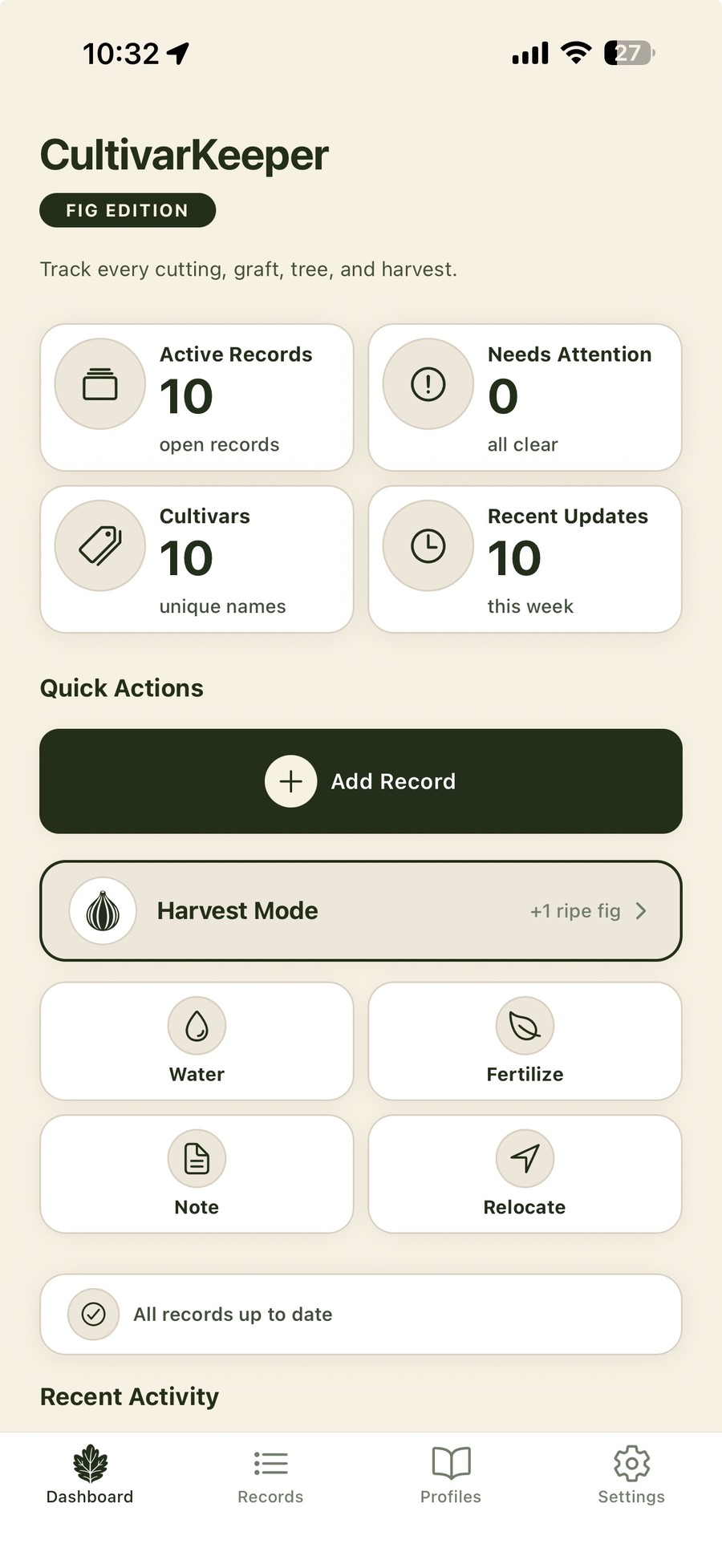
CultivarKeeper dashboard showing Active Records, Harvest Mode, Quick Actions, and Active Propagation on an iPhone

Built for the field, not just the browser.

The primary capture moment happens beside the plant: watering, fertilizing, losing a tag, seeing bud push, taking a harvest photo, or realizing a cutting failed. CultivarKeeper is designed mobile-first so those moments become reliable records instead of scattered notes.

  • Fast record actions for common field work.
  • Timeline history that keeps care, photos, harvests, and milestones together.
  • Identity and provenance fields close to the record, not buried as afterthoughts.
  • Backup and review workflows planned around messy real-world collection data.
Built around trust

The messy data is often the data worth protecting.

Identity survives uncertainty

Track confirmed, uncertain, unknown, and lost-tag records without pretending the answer is cleaner than it is.

Photos keep context

Photos belong with the record, event, harvest, or season they document so visual evidence remains useful later.

Account backup for records

Signed-in users can back up records, timeline data, and photo metadata. Photo image files stay on your device in the current version.

Sample · Collection memory

Black Madeira KK

Ficus carica · Acquired Mar 2026 · Source: trusted collector · Identity: confirmed

Crop type

Main only

Ripening

Late season

Cuttings

3 active

Trees

1 established

Recent activity

May 12 Photo evidence · cutting #2 showing root growth at base
May 08 Watered all 3 cuttings · bathroom setup
Apr 28 Up-potted established tree to 15-gal fabric pot

EARLY ACCESS

Capture in the field. Protect the record.

Private alpha is opening gradually as CultivarKeeper is tested against real fig collections, propagation history, harvest notes, photos, and field-entry workflows.

Join the early list iOS first · Android planned

Quick log · mobile

  • Watered todayWater
  • FertilizedFeed
  • Bud pushGrowth
  • Up-pottedCare
  • Harvest loggedHarvest
Resources · FAQ

Questions growers ask.

Do I need to be a serious collector to use this?

No. New growers start with a few trees and grow into the deeper features as their collection grows.

Does it work for fruits other than figs?

Right now it's figs only — the vocabulary and workflows are built specifically for fig growers.

Can I bring my existing spreadsheet across?

CSV import and export are planned so existing spreadsheets can move into CultivarKeeper without starting from scratch.

Where is my data stored?

When signed in, CultivarKeeper can back up records, cultivar profiles, timeline data, and photo metadata to your account. Photo image files stay on your iPhone in the current version. Cloud photo storage is planned but not live yet.