APP PREVIEW

What CultivarKeeper helps you remember.

CultivarKeeper is not trying to be a generic plant journal. It is a mobile-first field memory system for fig growers who need identity, source, propagation, care, harvest, and photo history to survive across seasons.
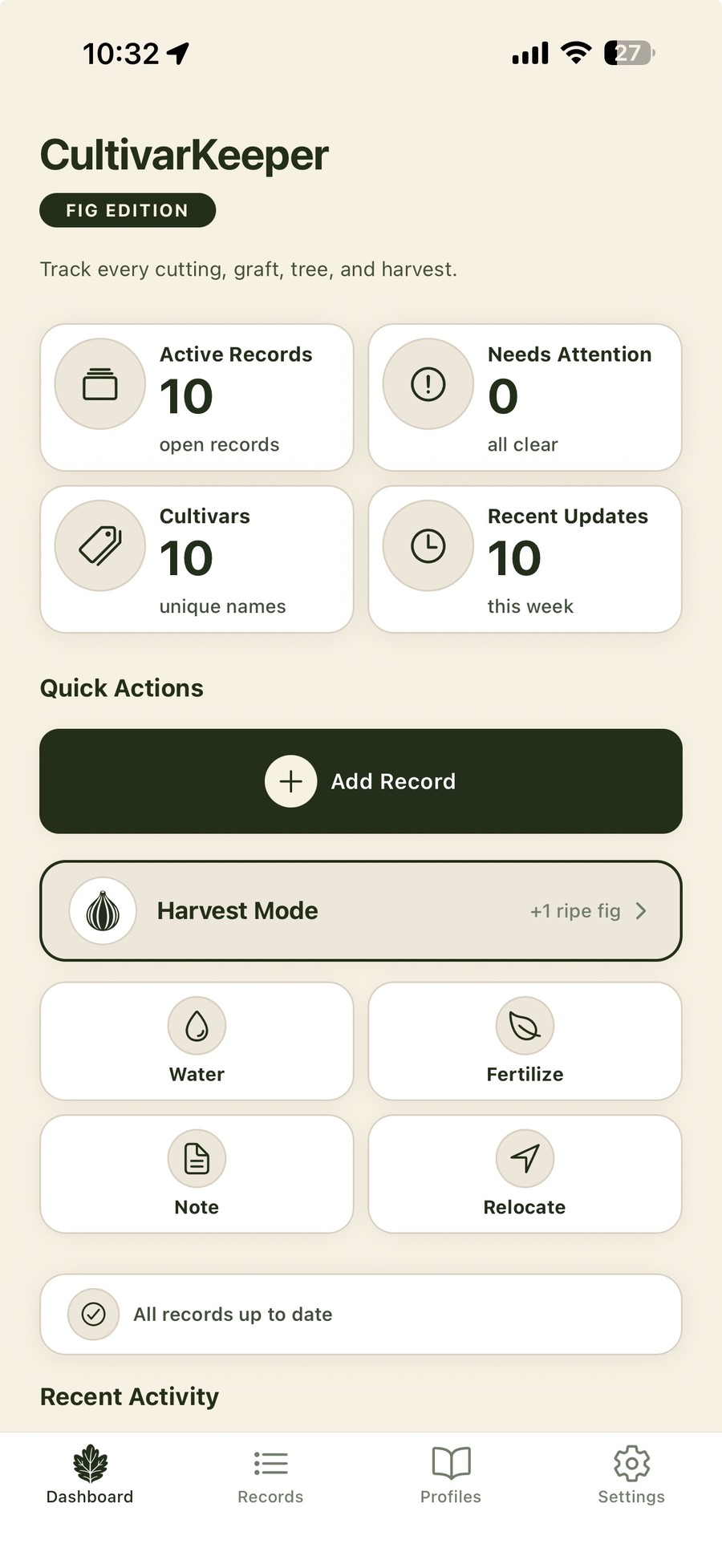
CultivarKeeper mobile dashboard showing records, quick actions, and harvest mode
Records

Each plant gets a memory, not just a name.

A CultivarKeeper record is the home base for a tree, cutting, graft, air layer, or batch. It keeps the practical field details close to the identity story.

Identity & context

Keep identity, source, and current state together.

For fig growers, the story matters: where the plant came from, whether the identity is confirmed, what pot it is in, and where it lives right now.

Record type

Tree, cutting, graft, air layer, or batch.

Status

Dormant, rooting, active, fruiting, failed, dead, or other state.

Source / provenance

Marketplace seller, collector, nursery, friend, or your own propagation source.

Location & pot size

Garden Area, garage, greenhouse, 20-gal fabric pot, or wherever the record actually lives.

Tags & uncertainty

Do not fake certainty when the tag is gone.

CultivarKeeper is designed for real collections where tags fade, labels get lost, and identity sometimes needs to be confirmed later.

Confirmed identity

Track records you trust and the source behind that trust.

Uncertain identity

Preserve suspicion without pretending it is fact.

Unknown / Needs ID

Keep the plant in the collection while making the identity problem visible.

Tag lost

Record the event instead of silently losing history.

Propagation

Track the messy middle between cutting and tree.

Most tools treat a plant as if it begins fully formed. CultivarKeeper keeps the propagation story: batches, bud push, roots observed, failed attempts, up-potting, and the notes you need next season.

Cuttings, batches, and transitions

From dormant stick to established record.

Track cuttings through the stages that matter to fig growers and preserve what worked, what failed, and what you would do differently next time.

Cutting batches

Group cuttings by cultivar, date, seller, source, or propagation attempt.

Rooting events

Roots observed, bud push, potting changes, and viability notes.

Failure history

Failed cuttings still teach you something. Keep them in the record.

Conversion path

Move from propagation record to tree record without losing the story.

Care & field entry

Fast enough to use while standing at the plant.

Field-entry speed is the product. CultivarKeeper is being shaped around quick actions for common field work and detailed entries when context matters.

Interaction model

Fast paths and detailed paths have different jobs.

Quick Actions capture the event with sensible defaults. Detailed forms let you add notes, photos, dates, quantities, ratings, and structured context. The same event should keep the same meaning either way.

Quick ActionsWatered, fertilized, relocated, up-potted, or marked in the field.
Log Care EventDetailed care notes, soil amendments, pruning, sprays, and photos.
Log HarvestStructured harvest entry with count, rating, notes, weight, and photos.
Harvest ModeRepeated fast picking with +1, +3, +5, custom, and done.
Harvests

Turn picking fruit into seasonal memory.

Harvest notes are not just counts. They help you remember first ripe dates, main crop performance, flavor notes, photos, and how a variety behaved in your climate.

Harvest mode & harvest records

Fast picking when you need it. Detailed entries when it matters.

Use Harvest Mode while picking. Use Log Harvest for the deeper record: quantity, rating, weight, notes, and photos.

Season totals

Total figs harvested, pick count, first harvest, and last harvest.

Tasting notes

Flavor, texture, sweetness, ripeness, and year-over-year impressions.

Harvest photos

Keep fruit photos tied to the specific harvest instead of lost in the camera roll.

Variety performance

Understand which cultivars actually produce for you.

Photos & timeline

Photos are evidence, not decoration.

A fig leaf, fruit interior, graft union, rooting base, tag photo, or seasonal comparison only matters later if it is attached to the right record and event.

Visual history

Keep the photo with the thing it proves.

Photos can support care entries, harvests, notes, milestones, record covers, and identity evidence. The goal is not more photos. The goal is photos that still mean something later.

Record photos

General visual history for a plant, cutting, graft, or batch.

Harvest photos

Fruit evidence tied to a specific harvest event.

Timeline context

Photos should appear with thumbnails or attached to meaningful events.

Identity evidence

Leaf, fruit, source, tag, and growth photos that support what a record is.

Trust & backup

A collection record should survive typos, edits, and messy field data.

CultivarKeeper is being built around the belief that the messiest data is often the data worth protecting. Backup and review workflows are part of the product, not an afterthought.

Account backup (records & timeline)

Preserve the record without pretending it is cleaner than it is.

The trust layer is designed to protect real-world collection history: uncertain identities, failed cuttings, malformed dates, and edits across seasons. Signed-in users can back up records, timeline data, and photo metadata. Photo image files remain on your device in the current version.

Review backup

See whether your local collection and account backup are in alignment.

Local-first capture

Field work should be fast even when you are not thinking about sync.

Honest warnings

When data is messy, surface it without silently discarding the story.

Exportability

Planned: user-owned records that can be backed up, reviewed, and exported.

Early access

Help shape the field memory system for fig growers.

CultivarKeeper is in private alpha and being tested with real collections before wider release.

Join the early list